If you’ve ever wondered which tools the professionals use to perfect their sound, then you’ve come to the right place. In this blog post we dive deep into the world of equalizers and show you why they are a crucial tool for mixing, mastering in audio post production and music production.
What is an Equalizer?
An equalizer, or EQ for short, is an essential tool in audio processing that lets you modify the frequencies in an audio signal. Whether you want to emphasise your bass or highlight the brilliance of your vocals — an equalizer is the key.
What types of equalizers are there?
There are several kinds of equalizers with their own specific advantages. The two most common, however, are:
- Graphic EQs, often used in live sound situations, and
- Parametric EQs, which allow very specific control via parameters.
What is an Equalizer Plugin?
An equalizer plugin is the digital version of the classic equalizer. It can be loaded in your Digital Audio Workstation (DAW) as a VST, AU, or AAX plugin and enables precise control over each frequency. But the question remains: do you really have to buy an equalizer plugin to make good music?
Do you have to buy an equalizer plugin if you want to make music?
The answer is no, because almost every DAW includes an equalizer plugin (so‑called stock plugins). However, there are good reasons why many professionals swear by third‑party equalizer plugins. Let’s first take a look at how equalizers actually work.
How is an Equalizer built?
An equalizer typically consists of several parameters that allow you to target specific frequency ranges in an audio signal.
Frequency
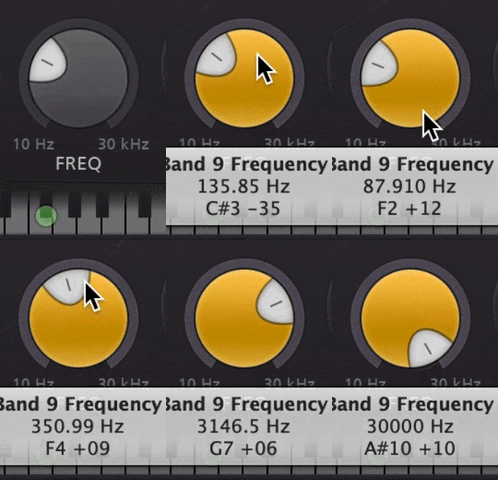
The frequency, measured in Hertz (Hz), usually spans from 0 Hz to 20 kHz and roughly corresponds to what the human ear can hear. Some equalizers even reach up to 40 kHz. Train your ears to identify frequency ranges precisely.
Gain
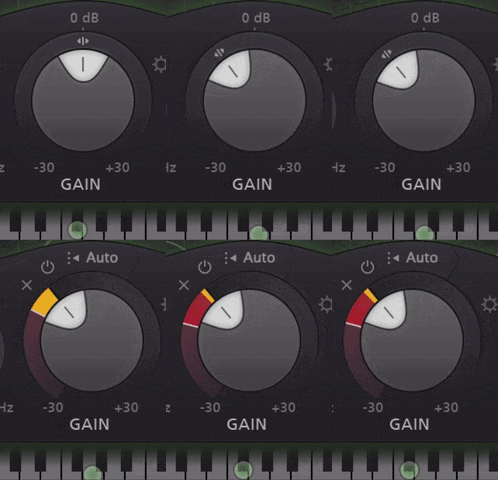
The gain control allows you to increase or decrease the volume of the selected frequency range and is one of the most important parameters of an EQ.
Filter Quality (Q‑Factor)
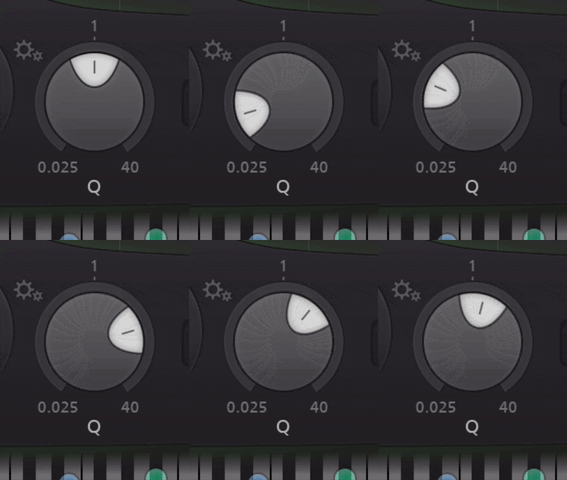
The Q‑factor determines the width of the affected frequency band. A higher Q means a narrower band, while a lower Q affects a broader range.
What EQ filter types are there?
Here’s a quick overview of the most common EQ filter types:

Peak EQ (also called Bell EQ)
Boosts or cuts specific frequencies around a chosen centre point.
High‑pass Filter (also known as Low‑Cut)
Lets frequencies above a certain point pass and attenuates everything below.
Low‑pass Filter (also known as High‑Cut)
The opposite of the high‑pass: it allows frequencies below a certain point and reduces everything above.
High‑Shelf Filter
Boosts or cuts all frequencies above a chosen cutoff.
Low‑Shelf Filter
Works like the high‑shelf but for frequencies below a certain threshold.
How to use an Equalizer Plugin?
Now that you know the fundamentals, it’s time to use an equalizer plugin effectively. Here are some general tips:
- Listen solo and in context: Before making changes, listen to the isolated element and then in the full mix to detect issues.
- Try dynamic settings: Experiment with subtle or dynamic EQ changes to make your mix sound more alive.
- Solo individual frequency bands: To address specific problem areas, listen to each band in isolation.
- Use M/S (Mid/Side) settings: Advanced engineers and professionals can place elements more precisely in the mix using Mid/Side EQ.
- Use oversampling if available: If your EQ plugin supports oversampling and your system can handle it, enable it to reduce unwanted artefacts.
Tips for using EQ Plugins:
-
Vocals & Rap
- Male voices:
- Emphasise ~200 Hz, 650 Hz, 2 kHz and ~6 kHz
- Reduce around ~400 Hz
- Female voices:
- Emphasise ~300 Hz, 800 Hz, 2.5 kHz and ~5 kHz
- Reduce around ~450 Hz
-
Melodic instruments like guitars, piano, strings or synths
- Highlight the character frequencies of each instrument and cautiously reduce unnecessary frequencies to keep the mix clean
-
Drums like Bass, Kick, Snare, Hi‑Hat or Percussions
- Kick Drum
- Boost around 80 Hz and ~2 kHz
- Reduce around ~500 Hz
- Snare
- Boost 100 Hz, ~1 kHz and ~4 kHz
- Reduce around ~300 Hz
- Apply a low‑cut below ~50 Hz
- Hi Hat
- Boost around ~400 Hz and ~2 kHz
- Reduce around ~600 Hz
Why should you buy equalizer plugins?
Investing in high‑quality third‑party EQ plugins can make a significant difference in your workflow and your sound. Premium EQ plugins often offer not only detailed control but also advanced features such as dynamics, Mid/Side processing, oversampling or extended visualisations.
You can often try many EQ plugins before purchase with free demos. Having a small selection of different plugins can’t hurt — find the ones that fit your style.
You can find more equalizer plugin recommendations here: The best EQ plugins for mixing and mastering
What should you look for when buying an EQ plugin?
When buying an equalizer plugin you should consider the features, ease of use and your budget — only purchase tools that truly advance your current development. Also decide whether you need a technical (transparent) or a colour‑shaping equalizer in your collection.
Which EQ plugins do we recommend?
Some of the top equalizer plugins on the market include:
For more recommendations, check our article: The best EQ plugins for mixing & mastering on audio.tips
Where can I buy Equalizer plugins?
We recommend buying your equalizer plugins from Plugin Boutique. You’ll find a huge range of options from simple, budget-friendly tools to advanced mastering-grade EQs plus frequent deals, bundle offers and an easy-to-use license manager for a smooth and hassle-free buying experience.